
Identify what happened and what facts matter.
Instant download
Lifetime access
Editable templates
Made for U.S. small businesses
issue signal
Website Malware + Blacklist
Technology issue active
Business owner search
How do I fix website malware + blacklist?
Collect the evidence, details, and wording.
Use the workflow, script, and tracker.
Guided resolution
Incident recovery plan
Technology
Website Malware + Blacklist Recovery Kit
In the first hour: open one incident case, save the malware warning, host notice, or Safe Browsing alert before cleanup starts, and isolate write access so you do not overwrite evidence while restoring service. Educational malware-recovery prep for U.S. site owners - not cybersecurity or legal advice; use a qualified pro when payment or customer data may be involved.
- PDF guide with a clear walkthrough
- Emergency checklist for the first actions
- Copy-paste scripts or templates
- Tracker or worksheet for follow-through
PDF guideEditable DOCXAction trackerChecklistScripts
$39
Buy now — instant download
Instant download · Secure Stripe checkout · Use it the same day · 7-day refund if it doesn't give you a clearer next step
Questions before you buy? Email us.
Or get all 144 kits for $29/mo — less than this one kit. Founding Member rate, locked for life; cancel anytime. After the founding window closes, the price rises to $39/mo for new members.
Get all 144 kits for $29/mo insteadBuilt by an operatorMeet the founder
Actionable & practicalNo fluff — just what works
Start in the first hourEmergency checklist up front
One-time purchaseYours to keep and reuse
Product preview
See the kit at a glance.
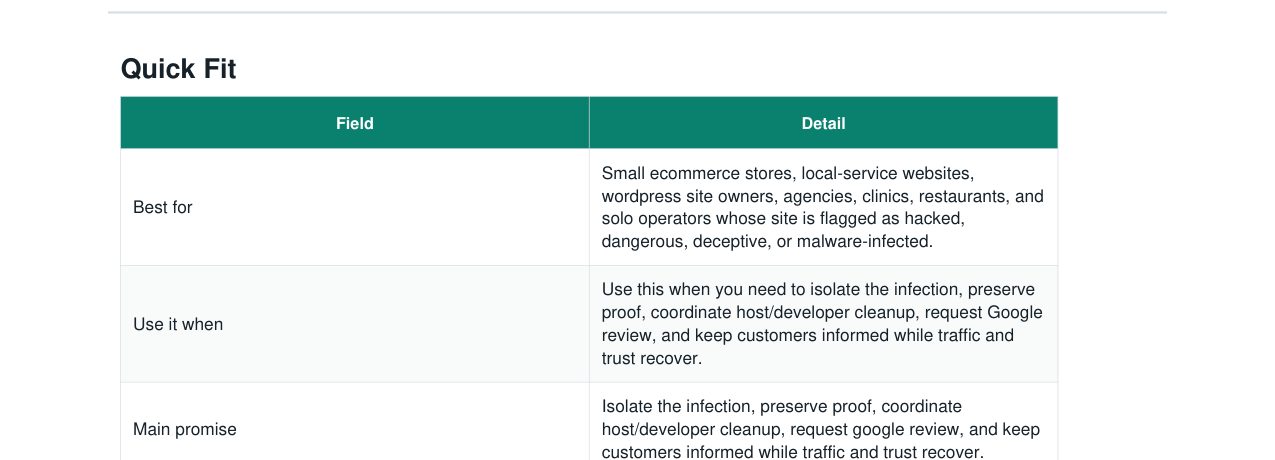
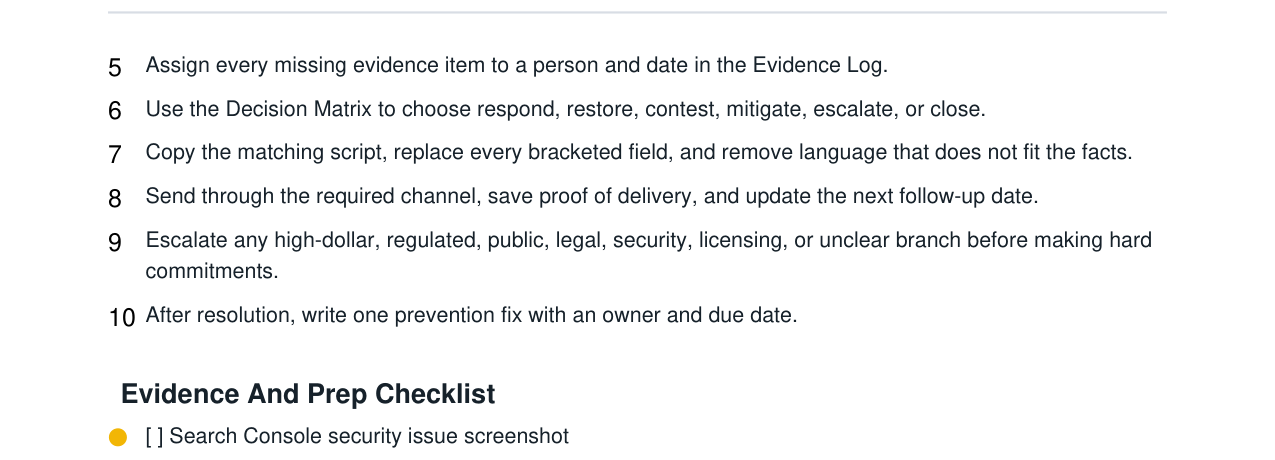
Real pages from the actual kit you download - not a mockup. Every kit includes the step-by-step PDF guide, editable Word templates, and a working spreadsheet.
- Step-by-step PDF guide written for this exact problem
- Editable templates & scripts in Word (opens in Google Docs too)
- A working tracker in Excel or Google Sheets
- Instant download - keep it and reuse it whenever the problem returns
Who it is for
Built for the exact moment this starts costing money, trust, or time.
Small ecommerce stores, local-service websites, wordpress site owners, agencies, clinics, restaurants, and solo operators whose site is flagged as hacked, dangerous, deceptive, or malware-infected.
This helps when
- getting the deadline, owner, evidence, and decision path out of scattered messages and into one control center
- separating urgent facts from guesses so the first response does not create a worse problem
- preserving records that disappear quickly: video, DNS state, platform notices, audit letters, screenshots, transaction logs, or assessment deadlines
- choosing the right branch: restore, respond, contest, mitigate, escalate, or close
- sending calm scripts that include real facts and avoid promises outside the business owner's control
- turning the incident into a prevention fix after the urgent file is stable
What this solves
A practical path from “what do I do now?” to a clear next action.
Use the guide, scripts, and tracker to organize the facts, choose the next move, and keep follow-up from slipping.
What you will be able to do
- A clear response plan, evidence map, deadline path, and prevention review.
- A consistent message set and operating playbook for the live file.
- A live control center showing what is open, missing, due, escalated, and closed.
How each file is used
- Read this first for the full website malware triage path, decision rules, mistakes to avoid, and deeper judgment calls.
- Customize the rules, decision matrix, SOP, and copy-paste scripts.
- Track cases, deadlines, exposure, evidence, status, decisions, and prevention fixes.
Included inside
- Step-by-step operating guide
- Emergency first-action checklist
- Copy-paste scripts or templates
- Tracker or worksheet for follow-through
FAQ
Common questions about this kit.
Who is the Website Malware + Blacklist Recovery Kit for?
Small ecommerce stores, local-service websites, wordpress site owners, agencies, clinics, restaurants, and solo operators whose site is flagged as hacked, dangerous, deceptive, or malware-infected.
What's included in the Website Malware + Blacklist Recovery Kit?
A step-by-step PDF guide, editable Word templates/scripts (they open in Microsoft Word or Google Docs), and a simple tracker/workbook for follow-through when it helps - delivered as an instant download.
Is this a one-time purchase or a subscription?
It is a one-time purchase of $39. You download the files and keep them - there is no recurring charge.
How do I get the Website Malware + Blacklist Recovery Kit after buying?
Instantly. After secure Stripe checkout you receive a private download link to the complete kit files.
Can I reuse it whenever the problem comes up again?
Yes. Use it across your own business as many times as you need. Please do not resell or redistribute the files.
Can I get a refund?
Yes. If the kit doesn't give you a clearer next step on your problem, email us within 7 days of purchase with your order ID and we'll refund you. Membership has its own 30-day money-back guarantee on the first payment.
Does this guarantee an outcome?
Educational and operational guidance only. Not cybersecurity, legal, privacy, SEO, hosting, or incident-response advice. Use a qualified security professional when payment data, customer data, regulated data, ransomware, or persistent compromise may be involved.
Important fit note
Clear guidance, not false certainty.
Educational and operational guidance only. Not cybersecurity, legal, privacy, SEO, hosting, or incident-response advice. Use a qualified security professional when payment data, customer data, regulated data, ransomware, or persistent compromise may be involved.
Website Malware + Blacklist Recovery Kit$39 · instant download
Buy now